Play Game

Powered by EmulatorJS · Arcade
Arcade Video game published 31 years ago:
Biomechanical Toy (c) 1995 Zeus.
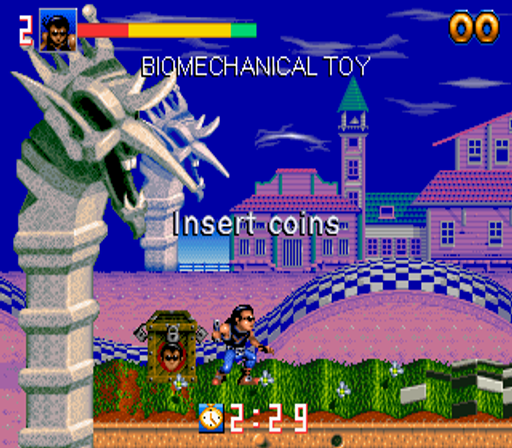
Biomechanical Toy is an eightway-scrolling platform shoot-em-up set in a world of magically-animated toys, in which the magical pendulum that animates the toys has been stolen by the evil 'Scrubby', a criminal once imprisoned for trying to steal the pendulum who has managed to escape and take his revenge. The player takes on the role of Inguz and is tasked with freeing the few remaining good toys that are trapped throughout the stages, while destroying or avoiding the many evil toys that now patrol the kingdom.
Inguz carries a basic, single-firing pistol, although additional ammo clips can be found throughout the game that upgrade the gun with either extra shot power, automatic firing or exploding bullets. When the gun's current ammo clip is empty, Inguz will take a moment to reload, leaving him vulnerable to attack. Freed toys will give help to Inguz by providing additional firepower for a short time.
Inguz begins each stage and each new life with a full health meter of eighty units, but food can be found that will replenish the meter. The player can lose a life either by running out of health, falling off the bottom of the screen (or into a hazard, such as a lava pit), or by running out of time. Clearing each stage awards bonus points based on both remaining time and health units.
Checkpoints - indicated by red flags - are located at certain points throughout the stages. In the event of losing a life, play restarts from the last checkpoint reached. Objects with Inguz's face on them (such as wooden chests and balloons) release bonus items when shot.
Player layout in our catalog: 1P.
If you are exploring by feel rather than by title, jump from the tags above into the matching genre rooms, or return to the Arcade hall for the full wall.
Open Play on this page to start Biomechanical Toy. Keyboard, USB/Bluetooth pads, and the on-screen touch gamepad all work inside the emulator bar. Save states and fullscreen live on that same bar so you can pause mid-session and resume later.
Biomechanical Toy (Zeus / Gaelco lineage cabinets) is a side-scrolling run-and-gun platformer: jump stages, shoot nests, and respect pits that punish rush tourism. Sprinting every gap as if falls never tax lives empties the credit mid-level. Your job is jump-and-shot honesty—peek landings, shoot when open, collect when calm. Continues buy stage memory; the exam is still clears with lives left under Biomechanical Toy paint.
Stage one: practice clean jump arcs into safe landings before inventing full-speed tourism across every gap. Shoot nests when the lane is honest; diving through projectiles for vanity is expensive. Early stages are timing labs under Biomechanical Toy dressing. One clean stretch with composure left beats three fall deaths that looked aggressive until a hazard you ignored arrived.
Run, jump, shot, items, enemy scripts, and stage layouts define Biomechanical Toy. Jumps are commitments—whiff a landing and the pit costs a life even if the sparkle looked perfect. Later stages mix platform and shoot density; early rush habits fail harder. Toy art sells charm; the stick still wants peek-and-hop discipline under denser run-and-gun rules.
Stages cleared with lives left beat rush tourism that empties resources mid-gap. Continues while fall deaths repeat; cut them once jump arcs are automatic. Farming stage one for vanity collects teaches the wrong muscle. Extends follow score when awarded—claim them after clean hops feel honest under denser stages, not after sprint greed that still falls.
Mash-shooting every pack, ignoring cover peeks, and dumping bombs on thin fodder burn Biomechanical Toy credits. Players also tunnel on one foe while a second chips from the flank. Holding center forever until both sides close turns a clear into a sandwich. Freezing mid-stage for looks while the curtain fills is classic tilt. Next run: peek cover, shoot calm, bomb when dense—stop inventing flashier run-and-gun tours mid-chip.
Contra is Konami if Biomechanical Toy’s peeks still feel opaque—run-and-gun literacy under clearer belt rules teaches calm before toy densifies. Wonder Boy III keeps Sega platform-shoot company warm under shop stages. Metal Slug is SNK once jump honesty sticks and you want denser metal peeks. Stay in action platformers until blind sprints stop feeling mandatory on every toy-stage gap.
Sources cited below under Further reading.
Biomechanical Toy is filed in our catalog as a 1994 release.
Player layout on this cabinet: 1P.
Genre tags on Classic Arcade Games: Platform.
Credit line lists Gaelco / Zeus as developer.


Nearby cabinets you may also open from this hall (each on its own play page):Atom, Bombjack Twin (set 1), Bubble Memories: The Story Of Bubble Bobble III (Ver 2.4O 1996/02/15), Bubble Bobble II (Ver 2.6O 1994/12/16), Charlie Ninja, Dark Tower, Diet Go Go (Euro v1.1 1992.09.26), Diver Boy, Dyna Gear, Elevator Action Returns (Ver 2.2O 1995/02/20), Fancy World - Earth of Crisis, Funky Jet (World, rev 1)
Atom · Bombjack Twin (set 1) · Bubble Memories: The Story Of Bubble Bobble III (Ver 2.4O 1996/02/15) · Bubble Bobble II (Ver 2.6O 1994/12/16) · Charlie Ninja · Dark Tower · Diet Go Go (Euro v1.1 1992.09.26) · Diver Boy · Dyna Gear · Elevator Action Returns (Ver 2.2O 1995/02/20) · Fancy World - Earth of Crisis · Funky Jet (World, rev 1)
Gaelco / Zeus appears on this cabinet’s credit line. Browse more titles from the same studio on the developer shelf, or stay on this page and try the next cabinets in the same hall.
Yes. Classic Arcade Games hosts Biomechanical Toy as a Arcade cabinet you can start on this page. The emulator loads in the browser; you do not need to install a separate app.
Arcade stick feel: Arrow keys for the joystick, X/Z (and nearby keys) for buttons, Enter=Start. USB / Bluetooth pads map cleanly; six-button fighters use the face-button cluster.
Our catalog tags Biomechanical Toy under Platform. Open those genre rooms from the tags on this page to find more playable cabinets in the same feel.
Copy the iframe code below to embed this game on your site.
<iframe src="https://classicarcade.games/games/arcade/biomtoy?embed=1" width="800" height="600" allowfullscreen allow="gamepad; autoplay; fullscreen"></iframe>