Play Game
Powered by EmulatorJS · Arcade
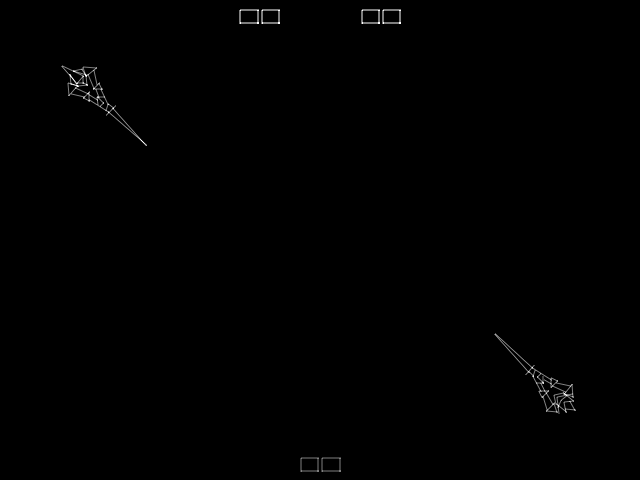
Two vector knights engage in combat within an overhead death pit. Players control a single knight to strike and outmaneuver their opponent in this fighter, utilizing the high-contrast vector graphics to track movement and positioning during the duel.
Player layout in our catalog: 2P sim.
If you are exploring by feel rather than by title, jump from the tags above into the matching genre rooms, or return to the Arcade hall for the full wall.
Open Play on this page to start Warrior. Keyboard, USB/Bluetooth pads, and the on-screen touch gamepad all work inside the emulator bar. Save states and fullscreen live on that same bar so you can pause mid-session and resume later.
Warrior is filed in our catalog as a 1979 release.
Player layout on this cabinet: 2P sim.
Genre tags on Classic Arcade Games: Fighter.
Credit line lists Vectorbeam as developer.

Nearby cabinets you may also open from this hall (each on its own play page):Speed Freak, Cheeky Mouse, 64th. Street - A Detective Story (World), Aero Fighters (World / USA + Canada / Korea / Hong Kong / Taiwan) (newer hardware), Alien Challenge (World), Aggressors of Dark Kombat / Tsuukai GANGAN Koushinkyoku (ADM-008 ~ ADH-008), Art of Fighting / Ryuuko no Ken (NGM-044 ~ NGH-044), Art of Fighting 2 / Ryuuko no Ken 2 (NGM-056), Art of Fighting 3 - The Path of the Warrior / Art of Fighting - Ryuuko no Ken Gaiden, Age Of Heroes - Silkroad 2 (v0.63 - 2001/02/07), Ninja Mission (Arcadia, set 1, V 2.5), Arabian Fight (World)
Cheeky Mouse · 64th. Street - A Detective Story (World) · Aero Fighters (World / USA + Canada / Korea / Hong Kong / Taiwan) (newer hardware) · Alien Challenge (World) · Aggressors of Dark Kombat / Tsuukai GANGAN Koushinkyoku (ADM-008 ~ ADH-008) · Art of Fighting / Ryuuko no Ken (NGM-044 ~ NGH-044) · Art of Fighting 2 / Ryuuko no Ken 2 (NGM-056) · Art of Fighting 3 - The Path of the Warrior / Art of Fighting - Ryuuko no Ken Gaiden · Age Of Heroes - Silkroad 2 (v0.63 - 2001/02/07) · Ninja Mission (Arcadia, set 1, V 2.5) · Arabian Fight (World) · Arabian Magic (Ver 1.0O 1992/07/06)
Vectorbeam appears on this cabinet’s credit line. Browse more titles from the same studio on the developer shelf, or stay on this page and try the next cabinets in the same hall.
Yes. Classic Arcade Games hosts Warrior as a Arcade cabinet you can start on this page. The emulator loads in the browser; you do not need to install a separate app.
Arcade stick feel: Arrow keys for the joystick, X/Z (and nearby keys) for buttons, Enter=Start. USB / Bluetooth pads map cleanly; six-button fighters use the face-button cluster.
Our catalog tags Warrior under Fighter. Open those genre rooms from the tags on this page to find more playable cabinets in the same feel.
Copy the iframe code below to embed this game on your site.
<iframe src="https://classicarcade.games/games/arcade/warrior?embed=1" width="800" height="600" allowfullscreen allow="gamepad; autoplay; fullscreen"></iframe>